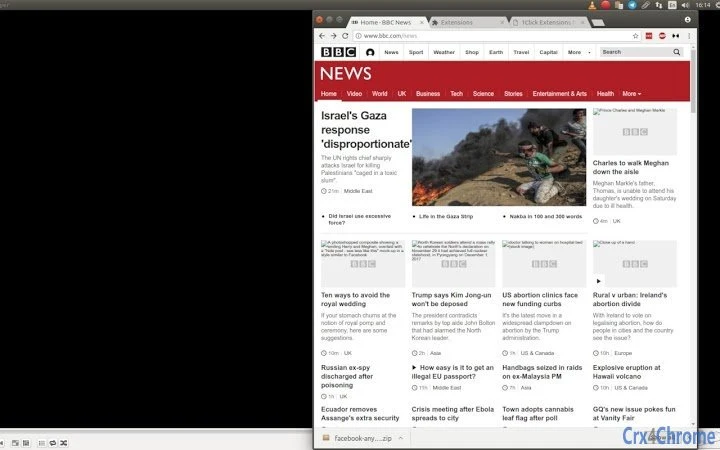

Zahmetsiz Yarı Ekran Pencere Yeniden Boyutlandırma
Genel Bakış
The 1ce Half-Screen Resizer is a lightweight browser extension designed to streamline multitasking by automatically resizing the active browser window to half of the screen width. This tool is particularly useful for users who frequently work with two windows side by side, such as comparing documents, monitoring live data, or managing multiple tabs while referencing external content. The extension operates directly within the Chrome browser environment and is intended for everyday productivity enhancement.
Targeted at professionals, students, and remote workers, this tool supports efficient workspace organization without requiring complex setup. Its open-source nature ensures transparency, allowing users to verify code integrity and contributing developers to participate in its evolution. The developer, 1ce, emphasizes community-driven development and privacy-first principles, aligning with modern digital safety standards.
Real-world usage scenarios include research workflows, coding sessions with documentation open, video calls alongside note-taking, and content creation requiring simultaneous access to reference materials. The extension is designed for simplicity, focusing on a single core function: precise, one-click window resizing. It does not require installation beyond the browser extension store, making it accessible to users of all technical skill levels.
Ana Özellikler ve Yetkinlikler
- Tek Tıklamalı Yarı Ekran Yeniden Boyutlandırma – Click the extension icon to instantly resize the current browser window to exactly half the screen width. Ideal for side-by-side comparisons and efficient multitasking.
- Açık Kaynak Şeffaflığı – The source code is publicly available, allowing users to inspect, audit, and contribute improvements. This fosters trust and community collaboration.
- Gizlilik Öncelikli Tasarım – No data is collected or transmitted. All operations occur locally on the user’s device, ensuring complete privacy and security.
- Sıfır İzin Gereksinimi – The extension does not request access to browsing history, cookies, or other sensitive data, minimizing security risks.
- Çok Platformlu Tarayıcı Desteği – Works across Windows, Mac, and Linux systems through the Chrome browser, ensuring broad accessibility.
Users can leverage the tool during research sessions to view a webpage and a notes tab side by side. Developers can use it to keep code documentation open while writing. Students can compare lecture slides with textbook content. The simplicity of the feature ensures immediate usability with no learning curve.
Kullanıcı Arayüzü, İş Akışı ve Performans
The user interface is minimal and focused, consisting of a single icon within the browser toolbar. Clicking the icon triggers the resize function without additional prompts or settings. The workflow is streamlined: install → click → done. There are no configuration options, which enhances usability but limits customization.
Navigation is intuitive, relying on the familiar browser environment. The extension does not introduce new menus or complex controls. Performance is expected to be efficient due to its lightweight design—200 KB in size—and operation within the browser’s sandboxed environment. The developer did not specify resource usage details, but based on general software behavior, the extension consumes minimal CPU and RAM.
Stability is likely high, as the tool performs a single, well-defined action without external dependencies. It does not interfere with other extensions or browser processes. No performance issues were reported in the provided information, and the absence of data collection reduces potential conflicts.
Uyumluluk ve Sistem Gereksinimleri
The extension is compatible with Windows, Mac, and Linux operating systems through the Chrome browser. The software version is 1.0.0, and the installation size is 200 KB. The developer did not provide additional system requirements, such as minimum RAM or processor specifications.
Compatibility information is limited to the supported platforms and browser. No specific hardware requirements were listed. The extension operates within the Chrome environment, so performance may vary slightly depending on the underlying OS and browser version. Users should ensure their Chrome browser is up to date for optimal functionality.
Artılar ve Eksiler
Artılar
- Verimli çoklu görev için basit, tek tıklamalı işlevsellik
- Tam şeffaflık ve topluluk katkı potansiyeli sunan açık kaynak
- Veri toplama veya dış erişim olmadan gizlilik odaklı
- Sadece 200 KB boyutunda hafif
- Gizli ücret veya abonelik olmadan ücretsiz kullanım
Eksiler
- Sadece Chrome tarayıcısı ile sınırlı (diğer tarayıcılara destek yok)
- Pencere konumu veya boyutu için özelleştirme seçeneği yok
- Yalnızca yarı ekran genişliğine yeniden boyutlandırır—alternatif boyut ön ayarları yok
- Chrome uzantı mağazası üzerinden kurulum gerektirir
- Gelişmiş ayarlar veya geri bildirim göstergeleri olmayan minimal UI
SSS Bölümü
Bu uzantı tüm tarayıcılarla uyumlu mu?
The extension is designed for Chrome and may not work on other browsers such as Firefox, Edge, or Safari. Users should check the official website for updates on cross-browser support.
Bu uzantıyı kullanırken verilerim güvende mi?
Yes. The extension does not collect or transmit any user data. All operations occur locally on your device. The open-source nature allows for public code review, enhancing trust and security.
Güncellemeler ne sıklıkla yayınlanıyor?
Updates are released as needed by the development team. The project is maintained by the 1ce community, and users are encouraged to track changes via the official website.
Kod tabanına katkıda bulunabilir miyim?
Yes. Since the extension is open-source, developers and contributors are welcome to review, improve, and submit changes to the code. Visit 1ce.org to learn how to participate.
Bu uzantıyı kullanmak için internet bağlantısı gerekli mi?
No. The extension functions entirely offline. It does not require internet access to resize windows or perform its core function.
Son Düşünceler
The 1ce Half-Screen Resizer delivers a focused, reliable solution for users seeking to optimize their browser workspace. Its minimalist design, open-source foundation, and strong privacy stance make it a trustworthy choice for professionals and casual users alike. While it lacks advanced customization, its single-purpose efficiency stands out in a crowded productivity landscape.
For anyone who frequently works with multiple browser windows side by side, this tool offers a frictionless way to enhance workflow. Its lightweight footprint and zero permissions further reinforce its value. The developer’s commitment to transparency and community engagement adds long-term credibility.
Download 1ce Half-Screen Resizer now to simplify your multitasking and reclaim screen real estate with confidence.







